Lessons learned from my cosmic expansion project
This past year, I’ve been taking some physics classes, and it had been a while since I’d worked on a programming project for fun. For a while, I’d had this idea to create a basic N-body simulation with gravity and expansion. I became interested in seeing it modeled when I came across some of Julian Barbour’s ideas about geometry in cosmology in his book “The Janus Point: A New Theory of Time”. The idea of seeing the shape of a system change independent of its scale sounded interesting, and by its nature ideal for a visualization.
It also seemed like a good sandbox to try out some software stuff I’ve been interested in, which is the primary focus of this post. I’d been using Haskell where I could for tasks in my physics classes because I like the language, and I thought this would be a good opportunity to learn more about it. In my classes I’d been using it for mathematical data-processing tasks, which were relatively simple. Doing a real-time simulation of a problem with nonlinear time complexity would force me to learn a bit more about the language, especially working more with mutable objects. (Most things I’d done were simple enough that I could keep them purely functional.) I initially wrote the UI code in Haskell using a library called Gloss, which uses OpenGL under the hood, but it seemed only natural to want to do it in a browser given my web development background, and how fun it would be to embed it in a personal website and share it easily with others. Luckily, Haskell can be compiled to WebAssembly (WASM), which was another shiny toy I’d never used before. On top of all that, AI coding tools were not something I had messed around with much, and I’d heard mixed reviews, so I thought it would be worth it to play around with them in this project. If the AI coding hype is real and it can 10x your productivity, it’s not something I want to miss out on and fall behind. And if it’s not, and the gains are only moderate and applications limited, at least I’ll have firsthand experience with the ups and downs to have better judgment about when and where to use it. So, what do I feel like I learned from this project?
Optimizing the real-time simulation in Haskell
I started with the naive approach and just did everything in the default functional way with all the list methods I was used to. At its core it is very simple: an update function called at fixed intervals, the output of which is used to update the positions of the particles in the UI and is then passed as input for the next iteration. The time complexity is O(n2) because every particle exerts a gravitational force on every other particle. There are algorithms that offer significant performance improvements at a small cost to accuracy, such as the Barnes-Hut method which groups particles spatially and treats distant groups as single particles to avoid calculating forces for every pair. However interesting these algorithms are, they seemed unnecessary as I was only trying to simulate enough particles for it to be visually interesting, and 100-200 seemed sufficient. Maybe I’ll revisit them sometime for more of a challenge.
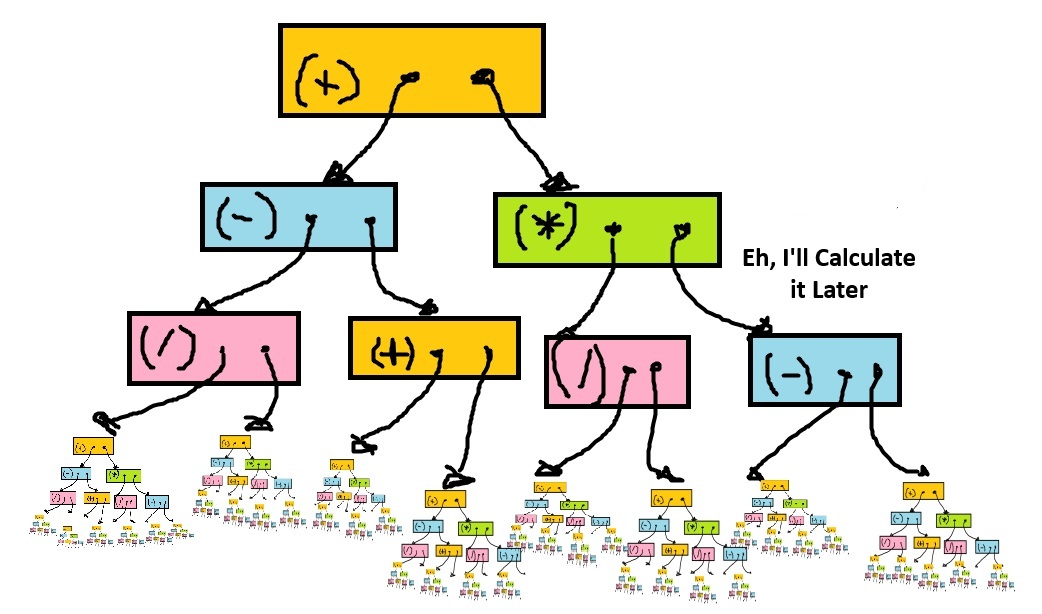
The first problem I ran into was related to Haskell’s lazy evaluation strategy. In most languages, all computations are performed immediately unless laziness is explicitly implemented somehow, like promise chains in JavaScript. However, Haskell’s default behavior is call-by-need, meaning expressions aren’t evaluated until they must be for some reason, such as use in an IO operation. Until evaluation is forced, Haskell builds up something called a thunk, which is a tree data structure representing the computation as an expression. For example, the expression “(1 + 2) * (3 + 4)” would be represented as a multiplication thunk that has two addition thunks as its leaves, which have the integer values as their leaves. This laziness-by-default can have some interesting advantages, such as never performing computations that don’t end up being used, but can also cause unintuitive problems if you are used to thinking about computation the “normal” way.
The problem started when I added a collapsible debug tray to the Haskell UI. When the debug tray wasn’t open, the values it displayed weren’t being rendered, but were still being “computed”
each frame. “Computed” meaning: not computed, but rather building an ever-growing thunk; these thunks were holding onto references to values from each previous frame, meaning that memory was never being freed.
The application would start dropping frames and getting slower and slower shortly after being opened, but would go back to the expected frame rate as soon as the debug tray was opened;
the values being rendered caused the thunks to be immediately evaluated each frame, preventing the thunk leak, which is a form of memory leak unique to this lazy evaluation strategy.
Something like this can happen in other languages, but is much rarer, because it can only occur when lazy evaluation is implemented explicitly. The solution was to add strict evaluation
to the values rendered in the debug tray, which was as easy as adding a ! to those fields.
The purely functional approach also caused the problems you might expect for a program repeatedly doing a lot of calculations in a small window of time. When processing arrays functionally you are forced to create a lot of intermediate immutable arrays for any iterative computation. These arrays hold object pointers and have a length equal to the number of particles you are simulating. The data for a single particle is not much, just 2D vectors for its position, velocity and acceleration (I decided to go with 2D). Given the data itself takes up so little memory, you can see how being careless with creating lots of immutable arrays for convenience in the hot path can actually allocate more memory than the data itself, which then immediately needs to be garbage-collected, since it’s only needed to update the positions and as input to the next step. The high amount of churn from computing values every frame was creating more memory than the garbage collector was able to keep up with. This was observable in pauses for garbage collection that broke the continuity of the simulation, which I really didn’t want.
First I tried unpacking the fields of the particles to see if that would make the garbage collection easier. Like other garbage-collected languages like Java, Haskell uses pointers and objects for all fields by default instead of making them a contiguous element in the object’s memory. I thought inlining these values might save the garbage collector some effort, but this didn’t make too much of a difference. The real problem, as mentioned above, was the multiple immutable arrays created as part of the iterative computations each frame. It turns out that large objects cause more memory problems than a similar amount of small objects due to compaction and memory fragmentation. The solution was to switch to using mutable buffers instead of doing things the functional way. This lowered the memory allocation each frame low enough to where the garbage collector was able to keep up, and I no longer saw long GC pauses; if there were any, they were short enough to not significantly interrupt the frame rate. Because I hadn’t used mutable variables much in my previous Haskell code, I was curious to see how much of a pain in the ass it might be. Fortunately the answer was not much at all. I really think the “immutable by default with explicit notation for mutable variables” approach is something that is easy to get used to, and once you’re used to it, it doesn’t get in the way too much for simple tasks. For more complicated ones, the rigor is helpful, because it gets you to think more explicitly about the memory usage of your program, as well as problems you might encounter with parallelism and concurrency.
My Experience Using AI
I’m sure many other people have written about and formed their own opinions from experience about AI at this point, but I thought I’d offer my two cents with regard to this project. I primarily used OpenAI’s GPT-5.2 Codex, and also briefly tried opencode. I used it fairly liberally to see how much I could do with just prompting before having to intervene. At first it actually did really well. It helped that I had a pretty clear outline of what I was trying to do, and the project was fairly simple. Implement the algorithm, write some simple UI code to render the particles, call the update in a loop. I think the biggest win was in writing the Haskell UI code using the Gloss library; it worked more or less on the first try, and I implemented most of the UI features by just asking it to add this or that, then tweaking whatever constants it created. I think it helped that what was being rendered was fairly simple; just circles with some color variation for the particles, and text for some of the debug values.
There were a few times where it made changes that explicitly went against what I told it to do. For example, before I switched to using buffers, I was trying to minimize the number of intermediate arrays I was using in the hot path, and when making changes it would add code that created more arrays just to make it look nice. It also made changes that subtly deviated from the documented integration method that I didn’t catch until a bit later because visually it was behaving as expected. (Really, accuracy is not as critical for the purposes of the visualization, but I still wanted it to be numerically accurate within a certain known order just for the sake of it.)
I had mostly poor results having it help me to debug; it did correctly identify that array allocation was causing most of the memory usage problems, but other than that asking it to figure out what it thought was going wrong felt like banging my head against the wall. The biggest waste of time was in getting the WASM to work, both getting it to compile and using it in the JavaScript code. I was hoping that it would make use of the documentation and get it right the way it had with the Gloss library, but no such luck. I ended up having to read all the documentation myself and review the code that it wrote to make sure that it was aligned. This is sort of what I was afraid of going into using AI; that instead of debugging code that I wrote, I would have to debug the code that it wrote which might or might not make any sense. I find reading, comprehending and editing dense code to be more unpleasant, and sometimes just as or even more time-consuming than writing it myself. Of course this is totally necessary when working with other people, but if all AI does is shift my effort when working alone from writing to reviewing without saving me much time, I’m not fond of that idea.
I think the clear difference between where it felt most useful and where it didn’t basically lies in whether I knew with total clarity what I was doing. When implementing the algorithm and writing the code for rendering the particles, I knew more or less exactly what I was looking for and essentially used the AI to convert pseudocode into real code, which did save me time. Using it to help me debug was a mixed bag; it did help me brainstorm some possible causes or areas for improvement which was nice, but when the problem wasn’t due to any of the potential causes it suggested, it threw me off a bit and maybe turned off my critical thinking brain slightly, I’m ashamed to say, which I then had to turn back on and set aside using AI to help me. In the case of the WASM implementation, I probably should have started by reading all the necessary documentation and then asking more explicitly for what I want, instead of hoping it would get it right and being forced to troubleshoot code that I didn’t yet have the right context to understand when it ultimately failed. I’ll probably continue to experiment with AI for future projects, but I’ll be more careful to always know more or less exactly what I want it to do before asking it to act.
In conclusion
I had a lot of fun with this project, and I hope to have more fun with visualizations in the future. At its best, using AI made me feel like Celery Man. I’ll probably try using another language like Rust or C++ since those might be more ideal performance-wise. Happy coding to you all!